Apache Kafka stretch cluster reference architecture

A Kafka reference architecture for a three DC stretch cluster deployment. Use this reference architecture to better understand the steps required to set up a Kafka stretch cluster.

A stretch cluster is a single logical Kafka cluster deployed across multiple Data Centers (DC) or other independent physical infrastructures such as cloud availability zones. Stretch clusters can be operated with three or more DCs. The most cost-effective and frequently used architecture is the three DC cluster.

Assuming that there is a zero Recovery Point Objective (RPO=0) requirement and the minimum required copies of the data residing in different DCs is two ( topics have replication factor of three, the number of minimum in sync replicas is two), a three DC stretch cluster can tolerate the failure of a single DC while remaining fully functional. In case of a second DC failure, the cluster will fail to process metadata operations because its metadata consensus quorum loses its majority (whether ZooKeeper ensemble majority or KRaft controller majority of N/2 + 1 voters). Topic creation, leader elections, broker fencing, and configuration changes halt. Existing produce and consume traffic to already-elected partition leaders continues on surviving brokers, and the latest (acknowledged) state of Kafka topics will still be accessible on the last cluster.

The following sections describe the planning and configuration steps needed to set up a three DC stretch cluster.
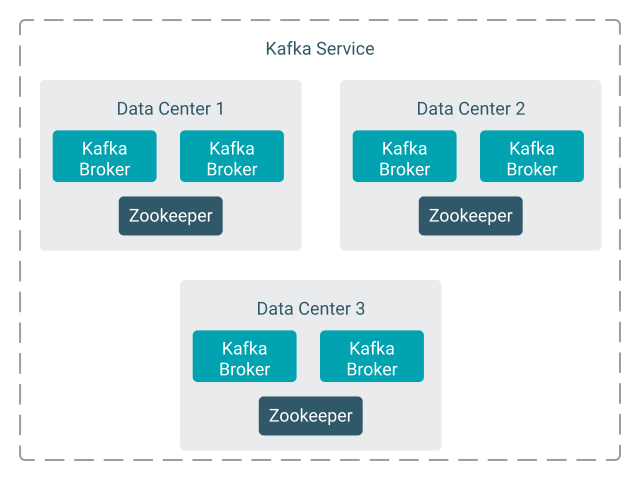
Figure 1. Kafka stretch cluster example with three Data Centers

Planning your deployment

Learn about the planning steps zou need to take when building and designing a Kafka stretch cluster.

Naming the Data Centers

In a Kafka stretch cluster deployment, each DC must have a name (ID). The names are used as the rack IDs when configuring the brokers of the stretch cluster. How you name the DCs is determined by your organization policies and rules on naming. Cloudera recommends that you choose unique and easily identifiable names.This guide refers to the three DCs as DC1, DC2, and DC3.

Choosing the number of replicas in a Data Center

The number of replicas inside the same DC affects the required storage capacity and the availability of the cluster in case of node failures. The number of replicas also defines the minimum number of brokers required per DC.

In the majority of cases, having a single replica inside a DC is sufficient. However, having more replicas has the following benefits:

  1. Increased availability. More broker failures can be tolerated without the topic being unavailable.
  2. Follower fetching is supported even in case of single broker failures.
  3. Increased data durability in case of disk failures.

Choose the number of replicas per DC based on your availability requirements. Once you have decided on the number, you need to calculate the replication factor (replication.factor) and the number of minimum in sync replicas (min.insync.replicas). The values you calculate are used when you configure the brokers, topics, and clients.

The replication factor of the topics can be calculated based on the number of DCs and the number of replicas per DC
[***DC COUNT***] * [***REPLICA PER DC***] = replication.factor
The minimum in sync replicas of the topics can be calculated based on the minimum DC copies and the replicas per DC.
[***REPLICA PER DC***] * ([***MINIMUM DC REPLICAS***] - 1) + 1 = min.insync.replicas

For example, assume that you have 3 Data Centers with 2 Kafka brokers each. Additionally, you have 2 replicas in each DC and you want to have a minimum of 2 DCs with replicas. In a case like this, the replication factor of the topics is 6, 3 * 2 = 6. The minimum in sync replicas is 3, 2 * (2-1) + 1 = 3. The cluster would look similar to the following example when all DCs are online:
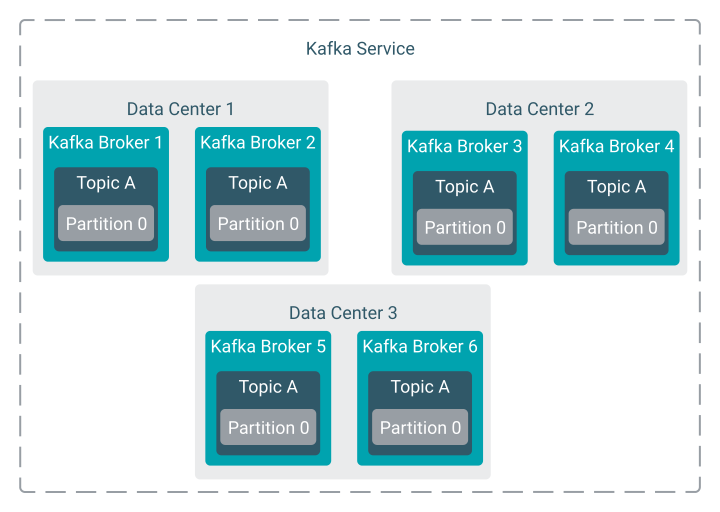
Figure 2. Kafka stretch cluster with three DCs and six replicas

The formula for calculating the minimum in-sync replicas ensures that even if you are experiencing a severe outage, there will be at least one replica available in two different DCs.
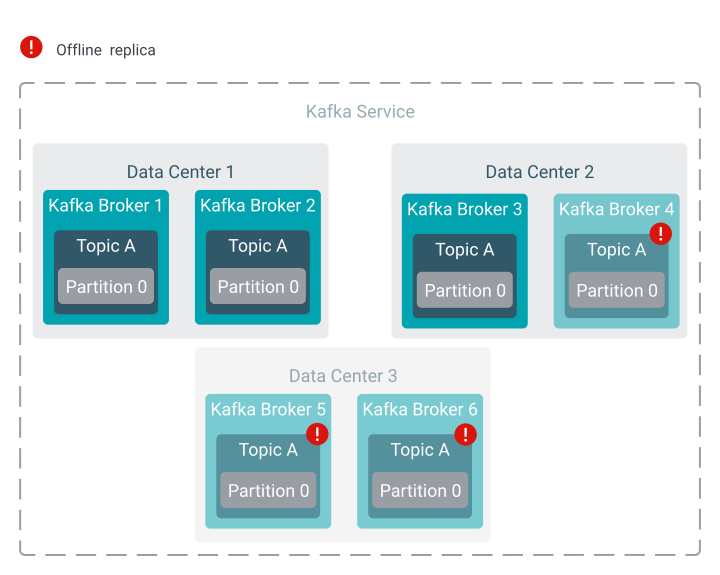
Figure 3. Kafka stretch cluster outage example

Collect network information and calculate buffer size

Because a stretch cluster is spread across multiple DCs, and those DCs can be located far away from each other, a stretch cluster will have higher latency compared to a traditional Kafka cluster. The latency must be accounted for and you will need to configure broker buffer sizes to adapt to the increased latency.

To calculate the buffer size, first, you must collect network information. Do the following:

  • Measure average round-trip time (RTT) between the DCs. Take note of the maximum of the averages. Cloudera recommends you take the measurements in seconds.
  • Measure the bandwidth of the links between the DCs. Cloudera recommends that you take the measurements in bytes/second.
Next, using these measurements, calculate the buffer size. Use the bandwidth-delay product formula:
[***RTT***] * [***BANDWIDTH***] = [***BUFFER SIZE***]
Ensure that the buffer size is calculated in bytes. For example if the RTT is 30 ms (0.03 s) and the bandwidth is 1 GB/s then:
0.03 s * 1 GB/s ~ 31 MB = 32505856 B

Configuring Kafka brokers and KRaft controllers

Learn how to configure Kafka brokers and KRaft controllers for a stretch cluster deployment.

After you finish planning your deployment, configure your brokers and metadata control plane. Step 1 applies to all deployments. Step 2 applies to KRaft deployments only. The following steps assume that Cloudera Runtime, Cloudera Manager, and the Kafka service are already installed on your cluster. Additionally, the following steps only cover the minimum configurations needed for a stretch cluster deployment. Depending on your requirements, additional configuration not detailed here, such as security configuration, might be required.
  1. Configure broker rack IDs (enable Kafka rack awareness).
    Broker rack IDs must be specified in order to ensure that replicas are evenly distributed among DCs. Broker rack IDs are specified using the Broker Rack ID property of the broker instance. The values you specify for the Broker Rack ID property should match the name of the DCs. This ensures that when a topic is created, its replicas are assigned in a round-robin fashion among the racks (or DCs in the case of this scenario).

    Repeat the following steps for each Kafka broker role instance.

    1. In Cloudera Manager, select the Kafka service.
    2. Go to Instances.
    3. Click any of the broker role instances and go to Configuration.
    4. Find and configure the Broker Rack ID property.
      Add the name of the DCs that the broker role instance is deployed in. For example, for the brokers deployed in DC1, you need to specify DC1 as the ID, for DC2 specify DC2, and so on.
    5. Click Save Changes.
  2. Deploy KRaft Controller role instances (KRaft deployments only).
    KRaft controllers do not have a rack-awareness mechanism of their own—the controller quorum voter set carries no rack information—so you must place controller role instances across DCs manually to ensure quorum survival. In a KRaft stretch cluster, the metadata quorum is provided by KRaft Controller role instances. To tolerate the failure of a single DC, deploy an odd number of KRaft Controllers (typically three or five) spread across your three DCs so that no single DC hosts a majority. For example:
    • 3 controllers total: 1 in DC1, 1 in DC2, 1 in DC3.
    • 5 controllers total: 2 in DC1, 2 in DC2, 1 in DC3.
    1. In Cloudera Manager, select the Kafka service.
    2. Go to Instances.
    3. Click Add Role Instances.
    4. Assign KRaft Controller roles to hosts in each of the three DCs, following the layout above.
    5. Complete the Add Role Instances wizard.

    Cloudera Manager automatically configures process.roles, controller.listener.names, and the dynamic controller quorum for you; you do not need to edit these properties by hand.

  3. Configure internal topics and metadata log durability.
    This step involves configuring the replication factor and minimum in-sync replica count for internal state topics. Use the values you calculated during deployment planning.
    1. In Cloudera Manager, select the Kafka service.
    2. Go to Configuration.
    3. Find and configure the following properties:
      • Offset Commit Topic Replication Factor
      • Minimum Number of Replicas in ISR
      • Transaction State Log Replication Factor
      • Minimum Number of Replicas in ISR for Transaction State Log
  4. Optional: Change defaults of automatically created topics.
    If Topic Auto Creation is set selected, topics can be automatically created by clients. To ensure that these topics are created with the required durability settings, the broker-level default replication factor must be changed to the value you calculated during planning. Additionally, unclean leader election must be disabled.
    1. Find and configure the Default Replication Factor property.
    2. Find and clear the Enable Unclean Leader Election property.
  5. Configure the broker buffer sizes to adapt to the increased latency of the stretch cluster.
    The buffer size you configure must be equivalent to or greater than the buffer size you calculated during planning.
    1. Find and configure the Socket send buffer size. property.
    2. Find and configure the Socket receive buffer size. (socket.receive.buffer.bytes) property.
    3. Find the Kafka Broker Advanced Configuration Snippet (Safety Valve) for kafka.properties property.
    4. Add the following configuration entry to the advanced configuration snippet:
      replica.socket.receive.buffer.bytes=[***BUFFER SIZE***]
  6. Optional: Enable follower fetching.
    To allow consumers to fetch from the closest replica instead of the leader, brokers must be configured to support follower fetching. Follower fetching allows consumers that have their physical location specified (in this case a DC) to fetch data from the replica located in the same location as the consumer. This can reduce cross-DC traffic.
    1. Find the Kafka Broker Advanced Configuration Snippet (Safety Valve) for kafka.properties property.
    2. Add the following configuration entry to the advanced configuration snippet:
      replica.selector.class=org.apache.kafka.common.replica.RackAwareReplicaSelector
  7. Tune KRaft parameters for cross-DC stability (KRaft deployments only).
    In stretch clusters spanning multiple Data Centers, cross-DC network latency spikes can cause transient timeouts on inter-controller RPCs. To prevent frequent, unnecessary controller leader elections and broker liveness churn during transient network instability, configure the following KRaft properties in Cloudera Manager:
    1. On each KRaft Controller role instance, configure Broker Heartbeat Interval and Broker Session Timeout.
      Set broker.heartbeat.interval.ms to 4000 (default: 2000) and broker.session.timeout.ms to 10000 (default: 9000).
    2. Find the KRaft Controller Advanced Configuration Snippet (Safety Valve) for kraft.properties property on each KRaft Controller role instance.
    3. Add the following configuration entries to the advanced configuration snippet:
      controller.quorum.fetch.timeout.ms=6000
      controller.quorum.request.timeout.ms=5000
      controller.quorum.election.timeout.ms=5000
      controller.quorum.election.backoff.max.ms=3000
  8. Click Save Changes.
  9. Restart the Kafka service.

Configuring topics and clients

Learn about the configuration required for topics and clients in a Kafka stretch cluster.

Configure topics

Topics must always use the calculated replication factor and minimum in-sync replica count to achieve the desired durability. Additionally, unclean leader election must be disabled. Based on how topics are created in the system, ensure that they are created with the correct configurations.

  • If topics are automatically created and you have followed Configuring Kafka brokers and KRaft controllers, no additional configuration is needed.
  • If topics are manually created, make sure that the administrators use the required configurations when creating the topics.
  • In case topics are created by the client applications, make sure to configure the clients to use the correct replication factor and minimum in-sync replica count.

Configure consumers

Consumer configuration in a stretch cluster deployment is only necessary if follower fetching is enabled for the broker. For follower fetching to function, configuration on the consumer’s side is also required. Configuration involves specifying the physical location of the consumer using the client.rack property.

The value of client.rack must match the DC names used in the Broker Rack ID property of each broker instance. For the consumers that are running in the DCs, set client.rack to the ID of the DC that the consumer is running in. If the consumer is deployed in a DC with no brokers, specify the ID of a DC that is closest to the consumer. Closest meaning either lowest latency or lowest cost of data transfer.

For example, if a consumer client is located in or closest to DC2, then your configuration should be the following:
client.rack=DC2
Consumers that do not have client.rack specified fall back to fetching from the leader.

Configure producers

Producers applications must respect the acknowledgment of records. Producers can only handle records as successfully written when the acknowledgement arrives. Additionally, producers must use acks=all to only receive the acknowledgement when the sufficient number of followers have replicated the record.

Configure Kafka Streams applications

Kafka Streams applications create internal topics based on their topology. To make sure that these topics meet the durability requirements, their replication factor must be correctly configured by setting the replication factor to the value you calculated during deployment planning. For example:
replication.factor=6
