Cloudera Migration Assistant deployment
Cloudera Migration Assistant uses a Master-Agent architecture to orchestrate migrations across distributed clusters with gateway, REST, authentication, metadata services, and optional Vault integration.
Architecture overview
Cloudera Migration Assistant uses a CMA Master-Agent model: a central CMA Master orchestrates migrations while CMA Agents on source and target clusters execute scans and replication commands.
Architecture diagram
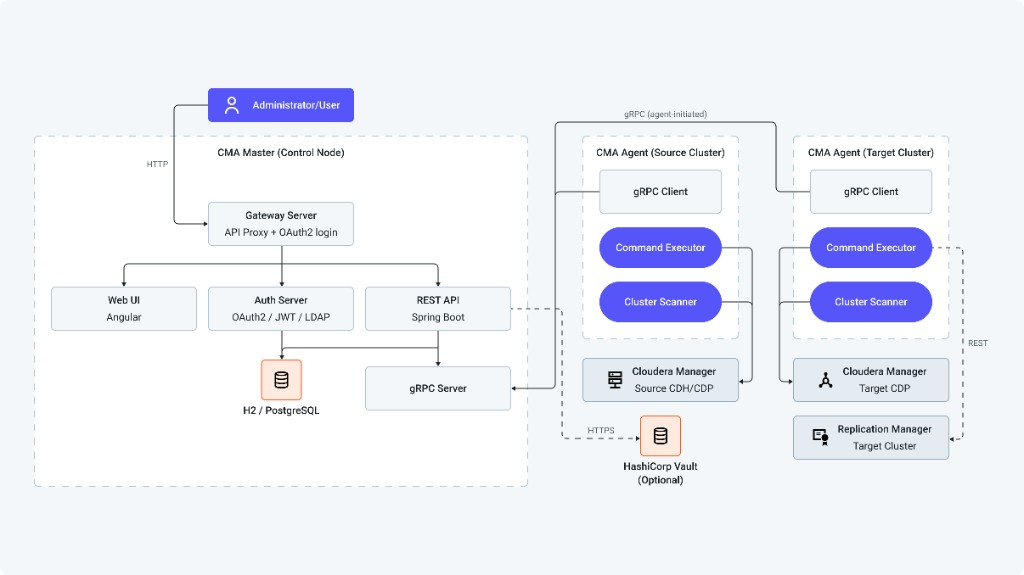
CMA Master
The CMA Master is the central control node deployed on a dedicated host or on a cluster node through Cloudera Manager.
| Component | Description |
|---|---|
| Gateway Server | Entry point for routing API requests to Master, directing authentication to the Auth Server, and handling OAuth2 login and session management. |
| Web UI | Angular-based interface for managing clusters, creating migration plans, and monitoring execution. |
| REST API | Spring Boot endpoints for governing all migration operations. |
| Auth Server | OAuth2/JWT-based authentication service with LDAP integration and role-based access control (RBAC). |
| Database | Repository for storing cluster metadata, migration plans, scan results, credentials, and execution history. H2 (embedded) for evaluation, PostgreSQL for production. |
| gRPC Server | Communication framework for handling bidirectional streaming communication with CMA Agents. |
CMA Master has the following key responsibilities:
-
Provides the administrative web interface.
-
Manages cluster registration (source and target).
-
Stores and displays scan results.
-
Orchestrates migration execution plans.
-
Dispatches commands to agents and tracks execution status.
-
Manages user authentication and authorization.
-
Optionally stores secrets in HashiCorp Vault.
CMA Agent
The CMA Agent runs on or near the source or target clusters and runs commands locally. It is deployed as a Cloudera Manager add-on service.
| Component | Description |
|---|---|
| gRPC Client | Maintains persistent outbound connection to the Master |
| Command Executor | Runs scanning and migration commands, and Ansible playbooks |
| Cluster Scanner | Scans cluster resources (HDFS, Hive, Ozone, Ranger) |
| Cluster Service | Interfaces with Cloudera Manager APIs |
CMA Agent has the following key responsibilities:
-
Connects to and registers with the CMA Master (outbound connection)
-
Runs commands received from the Master (scanning, migration, data replication)
-
Uploads scan results to the Master
-
Reports command execution status
-
Interfaces directly with cluster services through Cloudera Manager
Cloudera Replication Manager
For Cloudera Base on premises to Cloudera Base on premises migrations, CMA requires a Cloudera Replication Manager (Cloudera Replication Manager) service deployed through Cloudera Manager parcel on the target cluster. The CMA Agent on the target cluster communicates with Cloudera Replication Manager over REST to create and manage replication policies for data migration (HDFS, HDFS to Ozone).
Cloudera Replication Manager must be installed on the same node as Cloudera Manager on the target cluster. It is deployed as a separate parcel alongside the CMA parcel. For HDFS to Ozone migrations, the target cluster must run Cloudera Manager 7.13.2 or higher versions.
Communication model
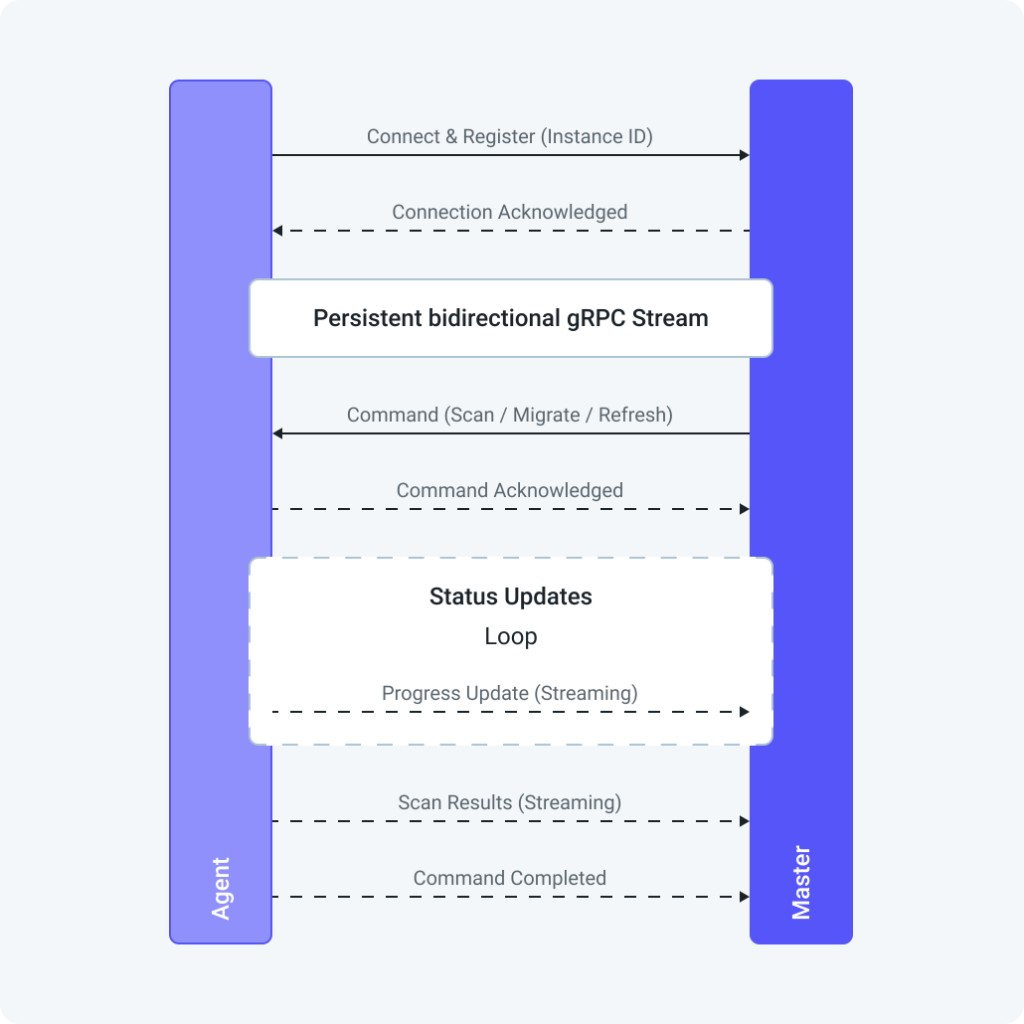
The communication model for CMA Master and CMA Agent has the following key characteristics:
-
Agent-initiated – Agents establish outbound connections to the Master to simplify firewall rules
-
Persistent – Connection remains active and automatically reconnects on failure
-
Bidirectional – Commands flow from the Master to the Agent, while results and status flow from the Agent to the Master
-
Concurrent – Multiple agents can connect simultaneously
gRPC services
| Service | Purpose |
|---|---|
CommandService |
Bidirectional streaming for command dispatch and acknowledgment |
CommandStateService |
Streaming for command status updates |
ScanService |
Streaming for scan result uploads |
CmaInstanceService |
Agent registration and instance management |
ManagedClusterService |
Cluster metadata synchronization |
Distributed deployment
The CMA Master runs on a control node while CMA Agents deploy on each cluster through Cloudera Manager parcels. This is the recommended production topology. For installation procedures, see Deploying the CMA server with parcels.
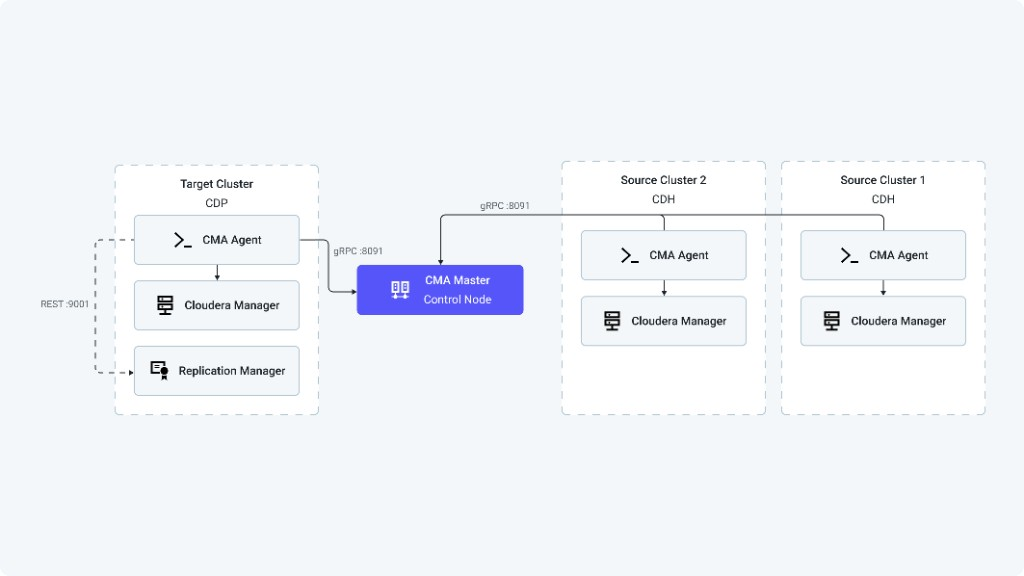
Distributed deployment provides the following benefits:
-
Scalability for multiple clusters
-
Reduced network latency for local operations
-
Isolated execution environments
-
Parallel scanning and migration across clusters
Cluster registration
In distributed deployments, cluster registration proceeds in the following order:
-
The administrator deploys CMA Agent service on the cluster through Cloudera Manager
-
The administrator configures the required properties using the Table 4 and Table 5tables.
-
The administrator starts the CMA Agent service.
-
The Cloudera Migration Assistant Agent automatically connects to the Cloudera Migration Assistant Master over gRPC.
-
The Cloudera Migration Assistant Agent registers the managed cluster with the Cloudera Migration Assistant Master.
-
Cluster is displayed in CMA Master UI ready for scanning.
| Property | Description |
|---|---|
cma_gateway_url |
URL of the CMA Gateway,
for
example,
https://master-host:8093.
Required when the CMA Agent is on a different cluster
than
the CMA Master. The agent uses this URL
to discover the Master host, gRPC port, and Auth Server URI automatically
through
the discovery endpoint (GET /api/agent/config). When connecting
from a different
cluster,
set the CMA Master service dependency to
none
in Cloudera Manager. |
cm_username |
Cloudera Manager administrator username |
cm_password |
Cloudera Manager administrator password |
cma_user_home |
Home directory for the cma-agent user,
for
example,
/home/cma-agent |
cma_agent_client_id |
OAuth2 client ID for agent-to-master
authentication.
Must match the value configured on the CMA Master. The default
value is cma-agent. |
cma_agent_client_secret |
OAuth2 client secret for agent-to-master authentication. Must match the value configured on the CMA Master. |
Finding the Gateway URL
In Cloudera Manager on the cluster where CMA Master is installed, open the CMA Master service and click the CMA UI
link.
The
URL shown in your browser (up to the port number) is the Gateway URL. The format is
https://<master-host>:8093
for
HTTPS
or http://<master-host>:8090
for
HTTP.
You can verify connectivity from the agent host by calling the
following
discovery endpoint:
curl -sk https://<master-host>:8093/api/agent/configThe response returns the Auth Server URI and gRPC endpoint that the agent will use.
| Property | Default | Description |
|---|---|---|
cma_java_home |
Auto-detected | JDK 17+ home directory |
cma_python3_executable |
python3 |
Python 3.11 executable path |
cma_agent_http_port |
9090 |
Agent HTTP port |
cma_agent_https_port |
9093 |
Agent HTTPS port |
kerberos.auth.enable |
false |
Kerberos authentication flag |
external_vault_url |
- | External Vault URL (if not using CM-managed Vault) |
Scanning flow
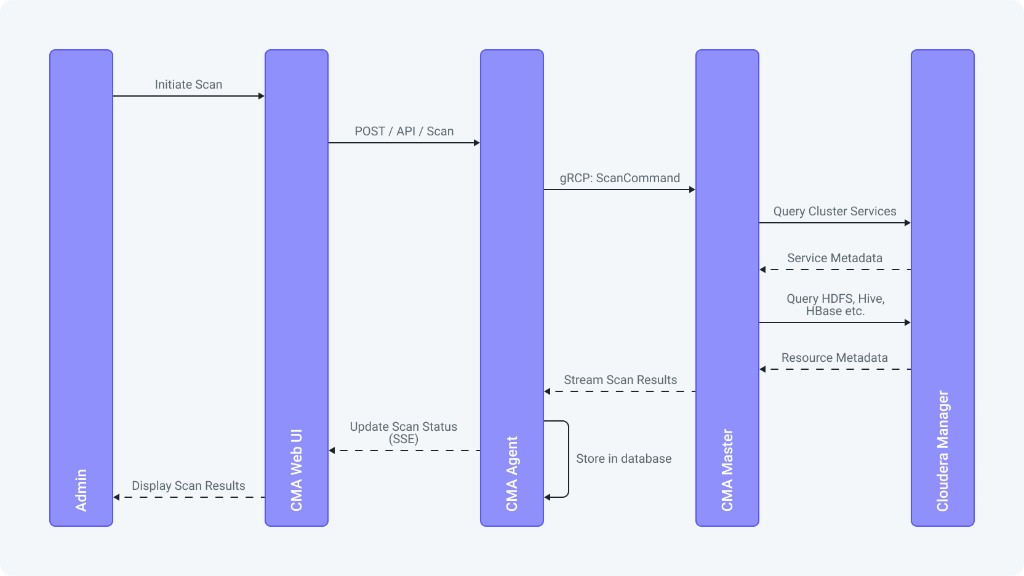
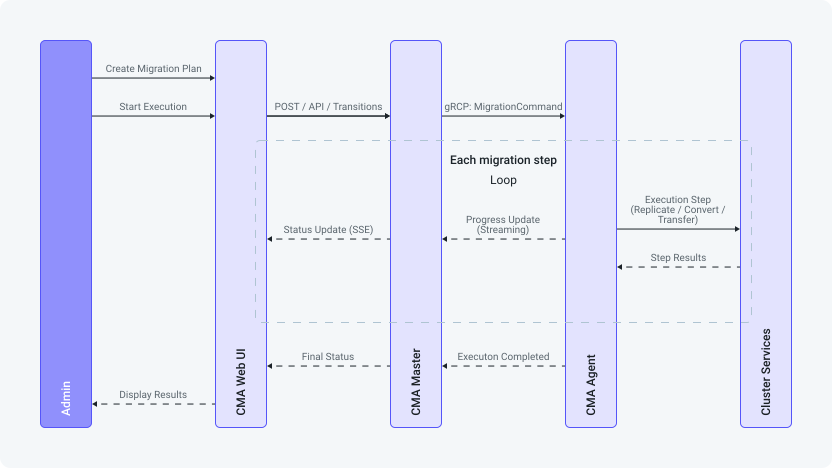
Migration flow
Service ports
| Service | HTTP port | HTTPS port | Purpose |
|---|---|---|---|
| Gateway Server | 8090 | 8093 | Web UI and REST API (entry point for users) |
| Master Server | 8890 | 8893 | Internal REST API |
| Master gRPC | 8091 | 8891 | Agent-to-Master communication (plaintext or TLS on the same port, depending on the configuration) |
| Auth Server | 9000 | 9443 | Authentication and token issuance |
| Agent Server | 9090 | 9093 | Agent local REST API |
| Cloudera Replication Manager | 9011 | - | Data replication policies (from Cloudera Base on premises to Base) |
Agent network requirements
| Requirement | Description |
|---|---|
| Outbound CMA Master connectivity | gRPC connection to the CMA Master on port 8091 |
| Cloudera Manager API access | HTTP or HTTPS connection to the Cloudera Manager API, typically port 7180 or 7183 |
| SSH access | SSH connection to cluster nodes for Ansible-based operations |
| Cluster service access | Network access to HDFS, Hive Metastore, HBase, and Ozone |
Firewall considerations
-
Cloudera Migration Assistant Agents initiate all connections to the Master (outbound from agent network).
-
Master does not need to initiate connections to agents.
-
Only the Gateway Server port (8090 or 8093) is required to be exposed to administrators.
-
Internal ports for the Master or the Auth Server can be restricted to the CMA host.
-
All traffic is encrypted when TLS is enabled. Cloudera recommends enabling TLS for production use.
Authentication
-
User Authentication – OAuth2/JWT through CMA Auth Server, with optional LDAP or Active Directory integration.
-
Agent Communication – gRPC with TLS encryption. Agents authenticate to the Master using OAuth2 client credentials (
cma_agent_client_idandcma_agent_client_secret). These must match on both the Master and Agent services. Cloudera recommends TLS encryption for production use. TLS is auto-bootstrapped in parcel deployments. -
Internal Service Authentication – The Gateway Server authenticates to the Auth Server using OAuth2 client credentials (
cma_client_idandcma_client_secret), configured on the CMA Master. -
Cluster Authentication – Cloudera Manager credentials stored in the database or HashiCorp Vault.
Authorization
CMA implements role-based access control (RBAC).
| Role | Permissions |
|---|---|
ROLE_CMA_ADMIN |
Full access to all features |
ROLE_CMA_OPERATOR |
|
ROLE_CMA_MIGRATOR |
|
ROLE_CMA_VIEWER |
Read-only access |
Credential management
-
Credentials can be stored encrypted in the database or in HashiCorp Vault. Cloudera recommends using HashiCorp Vaults for production use.
-
Vault integration uses KV v2 secret engine with short-lived access tokens.
-
SSH keys used for Ansible-based migration operations.
-
Cloudera Manager API credentials stored per-cluster.
Master HA
-
Database can be externalized to PostgreSQL for durability and backup.
-
Multiple Master instances are not currently supported (roadmap).
-
Cloudera recommends performing regular backup of database and configuration.
Agent HA
-
Agents automatically reconnect on connection loss.
-
Commands are idempotent whenever possible.
-
Status tracking allows resuming interrupted operations.
Troubleshooting
For common issues (agent connectivity, port conflicts, slow startup) and log file locations, see Troubleshooting.
