Data Engineering clusters
Learn about the default Data Engineering clusters, including cluster definition and template names, included services, and compatible Cloudera Runtime version.
Data Engineering provides a complete data processing solution, powered by Apache Spark and Apache Hive. Spark and Hive enable fast, scalable, fault-tolerant data engineering and analytics over petabytes of data.
Data Engineering cluster definition
This Data Engineering template includes a standalone deployment of Spark and Hive, as well as Apache Oozie for job scheduling and orchestration, Apache Livy for remote job submission, and Cloudera Data Explorer (Hue) and Apache Zeppelin for job authoring and interactive analysis.
- Cluster definition names
-
- Data Engineering for AWS
- Data Engineering HA - Spark3 for AWS
- Data Engineering Spark3 for AWS
- Data Engineering - Spark3 (ARM) for AWS
- Data Engineering HA - Spark3 (ARM) for AWS
- Cluster template name
-
- Data Engineering: Apache Spark3, Apache Hive, Apache Oozie
- Data Engineering: HA: Apache Spark3, Apache Hive, Apache Oozie
- Included services
-
- HDFS
- Hive
- Cloudera Data Explorer (Hue)
- Livy
- Spark 3
- Yarn
- Zeppelin is no longer supported starting with Cloudera Runtime version 7.3.1.
- ZooKeeper
- Oozie is supported for Spark 3 as of Cloudera Runtime version 7.2.18.
- Hive Warehouse Connector is supported as of Cloudera Runtime version 7.2.16.
- Compatible Cloudera Runtime version
-
- 7.2.15
- 7.2.16
- 7.2.17
- 7.2.18
- 7.3.1
- 7.3.2
Topology of the Data Engineering cluster
Topology is a set of host groups that are defined in the cluster template and cluster definition used by Data Engineering. Data Engineering uses the following topology:
| Host group | Description | Node configuration |
|---|---|---|
| Master Node count: 1 |
The master host group runs the components for managing the cluster resources including Cloudera Manager, Name Node, Resource Manager, as well as other master components such HiveServer2, HMS, Cloudera Data Explorer (Hue) etc. | For clusters created with Cloudera Runtime versions lower
than 7.2.14:
For clusters created with Cloudera Runtime versions
7.2.14 or higher versions:
|
| Worker Node count: 3 |
The worker host group runs the components that are used for executing processing tasks (such as NodeManager) and handling storing data in HDFS such as DataNode. | For clusters created with Cloudera Runtime versions lower
than 7.2.14:
For clusters created with Cloudera Runtime versions
7.2.14 or higher versions:
|
| Compute Node count: 0+ |
The compute host group can optionally be used for running data processing tasks (such as NodeManager). By default the number of compute nodes is set to 1 for proper configurations of YARN containers. This node group can be scaled down to 0 when there are no compute needs. Additionally, if load-based auto-scaling is enabled with minimum count set to 0, the compute nodegroup will be resized to 0 automatically. | For clusters created with Cloudera Runtime versions lower
than 7.2.14:
For clusters created with Cloudera Runtime versions
7.2.14 or higher versions:
|
| Gateway Node count: 0+ |
The gateway host group can optionally be used for connecting to the cluster endpoints like Oozie, Beeline etc. This nodegroup does not run any critical services. This nodegroup resides in the same subnet as the rest of the nodegroups. If additional software binaries are required they could be installed using recipes. | m5.2xlarge; gp2 - 100 GB |
Configurations
| Host group | Service configuration |
|---|---|
| Master | Cloudera Manager, HDFS, Hive (on Tez), HMS, Yarn RM, Oozie, Cloudera Data Explorer (Hue), Zookeeper, Livy, and Sqoop |
| Gateway | Configurations for the services on the master node |
| Worker | Data Node and YARN NodeManager |
| Compute | YARN NodeManager |
Note the following:
- There is a Hive Metastore Service (HMS) running in the cluster that talks to the same database instance as the Data Lake in the environment.
- If you use CLI to create the cluster, you can optionally pass an argument to create an external database for the cluster use such as Cloudera Manager, Oozie, Cloudera Data Explorer (Hue), and DAS. This database is by default embedded in the master node external volume. If you specify the external database to be of type HA or NON_HA, the database will be provisioned in the cloud provider. For all these types of databases the lifecycle is still associated with the cluster, so upon deletion of the cluster, the database will also be deleted.
- The HDFS in this cluster is for storing the intermediary processing data. For resiliency, store the data in the cloud object stores.
- For high availability requirements choose the Data Engineering High Availability cluster shape.
Architecture of the Data Engineering HA cluster
- Cloudera Manager
- YARN Job History Server
- YARN Queue Manager
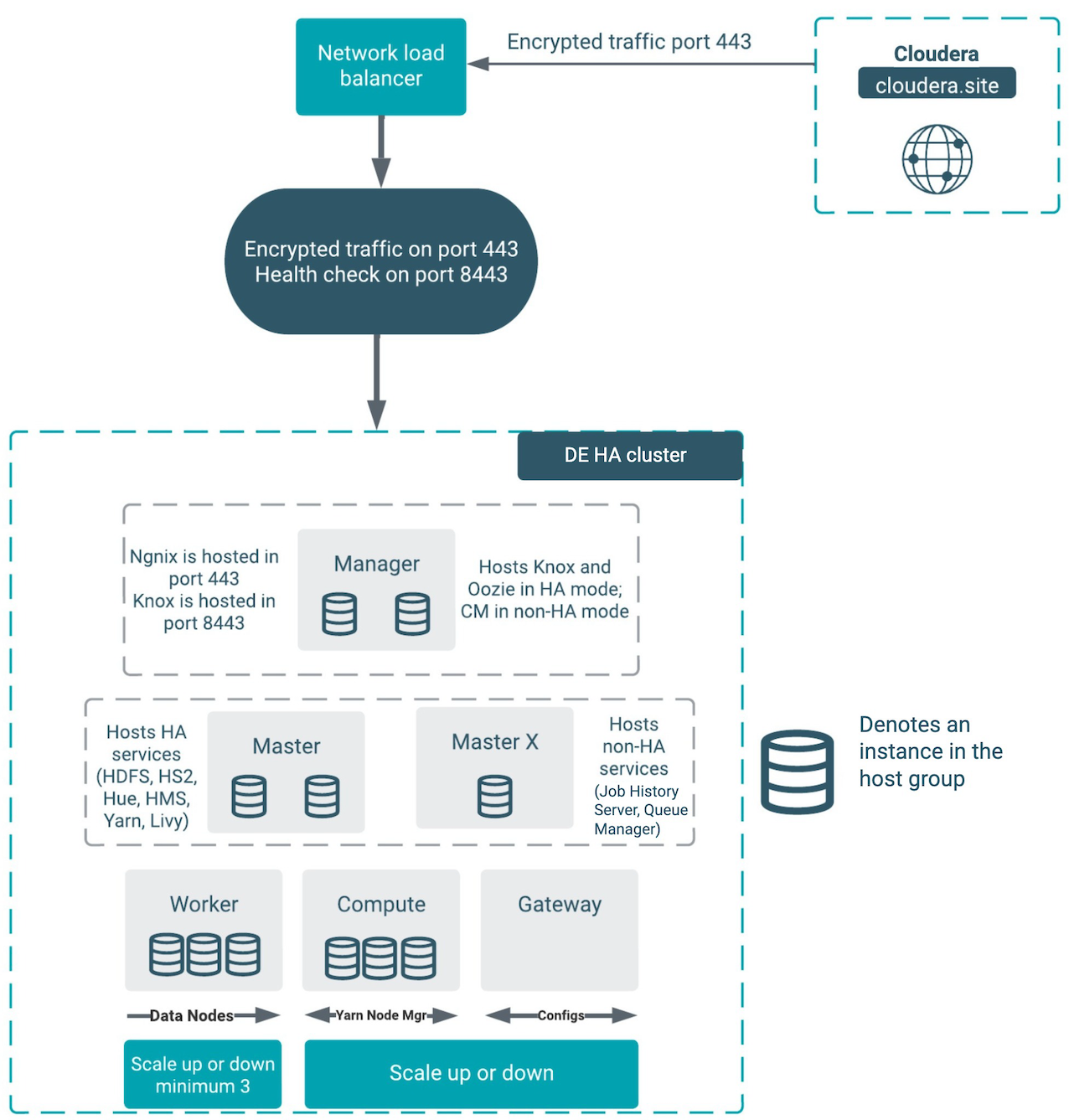
The architecture outlined in the diagram above handles the failure of one node in all of the host groups except for the “masterx” group. See the Known usability scenarios for the DE HA clusters section below for additional details about the component interactions in failure mode.
Known usability scenarios for the DE HA clusters
- Cloudera Manager
- YARN Job History Server
- YARN Queue Manager
The following tables detail the known scenarios that can happen in case of any node or service failure when using the DE HA template:
| Node | Failure | User experience |
|---|---|---|
| Manager node | Manager node is down with the Cloudera Manager server. | Failure as Cloudera Manager is not HA. |
| Manager node is down without the Cloudera Manager server. | No impact on workload, jobs are scheduled and executed. Autoscaling is also triggered. |
|
| Master node | One of the master nodes is down. | No impact on workload, jobs are scheduled and executed. Autoscaling is also triggered. |
| Masterx node | Masterx node is down. | As the masterx node is down, the YARN Job History server is down. Oozie appears to be running, but the jobs are not submitted to YARN. |
| Worker node | One of the worker nodes is down. | No impact on workload, jobs are scheduled and executed. Autoscaling is also triggered. |
| More than one worker node is down. | If more than one worker node is down, the jobs are scheduled, but they will not be executed. Jobs will fail if all of the worker nodes are down. | |
| Compute node | One of the compute nodes is down. | No impact on workload, jobs are scheduled and executed. Autoscaling is also triggered. |
| More than one compute node is down. | If more than one compute node is down, the jobs are scheduled, but they will not be executed. Jobs will fail if all of the compute nodes are down. | |
| All nodes | Nodes are down in the entire Availability Zone 2, and one node includes the Cloudera Manager server. | Failure as Cloudera Manager is not HA. |
| Nodes are down in the entire Availability Zone 1 with masterx and master nodes. | As the masterx node is down, the YARN Job History server is down. Oozie appears to be running, but the jobs are not submitted to YARN. | |
| Nodes are down in the entire Availability Zone 3 with worker and compute nodes. | No impact on workload, jobs are scheduled and executed. Autoscaling is also triggered. |
| Service | Failure | User experience |
|---|---|---|
| Knox | One of the Knox services is down. | External users will still be able to access all of the UIs, APIs, and JDBC. |
| One of the Knox Gateway is down on the manager node. | No impact on workload, jobs are scheduled and executed. | |
| Cloudera Manager | The first node in the manager host group is down. | The cluster operations (such as repair, scaling, and upgrade) will not work. |
| The second node in the manager host group is down. | No impact. | |
| Hive | One of the HMS services is down on one of the master nodes. | No impact on workload, jobs are scheduled and executed. Autoscaling is also triggered. |
| One of the Hive servers is down on one of the master nodes. | No impact on workload, jobs are scheduled and executed. Autoscaling is also triggered. |
|
| One of the HS2 services is down in the master host group. | External users will still be able to access the Hive service via JDBC. But if Cloudera Data Explorer (Hue) was accessing that particular service it would not failover to the other host. The quick fix for Data Explorer is to restart Data Explorer to be able to use Hive functionality. | |
| Running Hive job using ODBC/JDBC, and one of the dependent servers (HS2 and HMS) is down. | No impact on workload, jobs are scheduled and executed. Autoscaling is also triggered. If the Hive server, which is used to execute a job, goes down during the execution, the job fails. After retrying the failed jobs, the request would go to the running Hive server and the jobs are executed successfully. |
|
| Cloudera Data Explorer (Hue) | One of the Data Explorer services is down in master host group | No impact. |
| One of the Data Explorer load balancers is down on one of the master nodes. | No impact on workload, jobs are scheduled and executed. Autoscaling is also triggered. |
|
| Livy | One of the Livy servers is down on one of the master odes. | No impact on workload, jobs are scheduled and executed. Autoscaling is also triggered. |
| Spark | One of the Spark running on YARN History Server is down on one of the master nodes. | No impact on workload, jobs are scheduled and executed. Autoscaling is also triggered. |
| Running a Spark job using Livy server, and any of the dependent servers (Resource Manager, Node Manager, ZooKeeper, Livy and Gateway) is down. | No impact on workload, jobs are scheduled and executed. Autoscaling is also triggered. |
|
| YARN | One of the YARN services is down. | No impact. |
| Job History server is down. | The Oozie jobs can be scheduled, but as the Job History server is down, the jobs are not executed. | |
| One Resource Manager is down on one of the master nodes. | No impact on workload, jobs are scheduled and executed. However, due to the concerning health of YARN, autoscaling is disabled, and jobs that require additional resources will take a longer time to complete. | |
| One of the Node Managers is down on the compute node. | No impact on workload, jobs are scheduled and executed. Autoscaling is also triggered. |
|
| One of the Node Managers is down on the worker node. | No impact on workload, jobs are scheduled and executed. Autoscaling is also triggered. |
|
| Queue Manager WebApp and Store is down on the masterx node. | YARN queue reconfiguration is not possible, new and existing workloads are
not impacted. Autoscaling is also triggered. |
|
| HDFS | One of the Datanode is down on the worker node. | No impact on workload, jobs are scheduled and executed. Autoscaling is also triggered. |
| One of the Namenode is down on one of the master nodes. | No impact on workload, jobs are scheduled and executed. Autoscaling is also triggered. |
|
| HDFS Balancer is down on the masterx node. | No impact on workload, jobs are scheduled and executed. Autoscaling is also triggered. |
|
| One of the HDFS Failover Controllers is down on one of the master nodes. | No impact on workload, jobs are scheduled and executed. Autoscaling is also triggered. |
|
| One of the HDFS HTTPFS servers is down on one of the master nodes. | No impact on workload, jobs are scheduled and executed. Autoscaling is also triggered. |
|
| One of the HDFS Journal is down on one of the master nodes or on the masterx node. | No impact on workload, jobs are scheduled and executed. Autoscaling is also triggered. |
|
| Nginx | Nginx in one of the manager hosts is down. | Fifty percent of the UI, API, and JDBC calls will be affected. If the entire manager node is down, there is no impact. This is caused by the process of forwarding and health checking that is done by the network load-balancer. |
| Oozie | One of the Oozie servers is down in the manager host group. | No impact for AWS and Azure as of Cloudera Runtime version 7.2.11. If you create a custom template for DE HA, follow these two rules:
|
| Gateway | One of the Gateways is down on one of the manager nodes. | No impact on workload, jobs are scheduled and executed. Autoscaling is also triggered. |
| ZooKeeper | ZooKeeper server is down on one of the master nodes or on the masterx node. | No impact on workload, jobs are scheduled and executed. Autoscaling is also triggered. |
Custom templates
Any custom DE HA template that you create must be forked from the default templates of the
corresponding version. You must create a custom cluster definition for this with the JSON
parameter “enableLoadBalancers”: true , using the
create-aws/azure/gcp-cluster CLI command parameter
--request-template. Support for pre-existing custom cluster definitions
will be added in a future release. As with the template, the custom cluster definition must
be forked from the default cluster definition. You are allowed to modify the instance types
and disks in the custom cluster definition. You must not change the placement of the
services like Cloudera Manager, Oozie, and Data Explorer. Currently
the custom template is fully supported only via CLI.
The simplest way to change the DE HA definition is to create a custom cluster definition. In the Create Data Hub UI when you click Advanced Options, the default definition is not used fully, which will cause issues in the HA setup.
