Upgrade and migration paths
Cloudera recommends running Apache NiFi on Cloudera Data Platform (CDP) by installing the Cloudera Flow Management (CFM) parcel on CDP to take advantage of the latest new features and updates. This document describes the supported upgrade and migration paths for legacy deployments and earlier CFM versions running on CDP Private Cloud Base, and outline how to move to more recent CFM 2.x versions running on the Cloudera Data Platform.
Overview of upgrade and migration paths for NiFi 1–based CFM versions
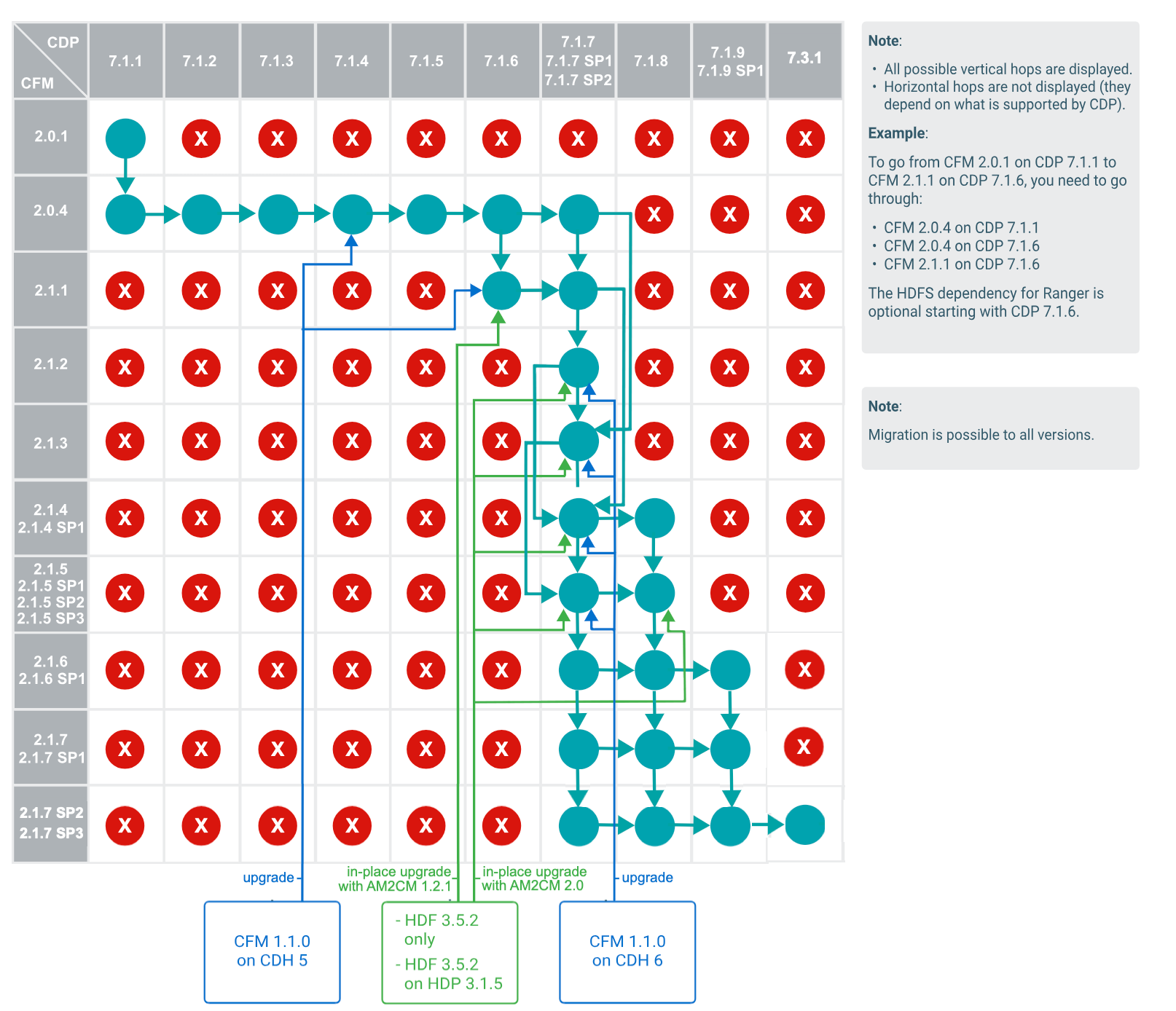
Depending on your starting point, you may follow different paths. Each scenario below summarizes the supported paths and the highest possible target version.
You are using CFM 2.x on CDP Private Cloud Base
If you are using CFM 2.x on CDP Private Cloud Base 7.1.1-7.1.9 and want to upgrade to a newer CFM version, there are specific upgrade paths available for you. Review them in the Upgrade and migration paths diagram and see the procedure steps in the following table:
| Upgrade | |
|---|---|
| Step 1. | Upgrade CFM to 2.0.4 if you are using CFM 2.0.1. |
| Step 2. | Upgrade CDP Private Cloud Base to 7.1.7, 7.1.7 SP1, or 7.1.7 SP2. |
| Step 3. |
Check the Upgrade and migration paths diagram to identify the sequence of intermediate upgrades required to transition from your current CFM version to the desired one. Upgrade to CFM 2.1.5 from lower CFM 2.x versions. |
| Step 4. | |
You are using CFM 1.x on CDH or a standalone CFM 1.x
If you are running CFM 1.x on CDH 5 or CDH 6, or as standalone CFM, and you want to upgrade to a higher CFM version, there are specific upgrade paths that you can take. Compare the different upgrade options in the Upgrade and migration paths diagram and see the migration and upgrade procedure steps in the following table:
| Migration | Upgrade from CFM 1.x on CDH 6 | Upgrade from CFM 1.x on CDH 5 | Upgrade from standalone CFM 1.x | |||||
|---|---|---|---|---|---|---|---|---|
| Step 1. | Upgrade from CFM 1.0.0 to CFM 1.1.0 | Upgrade from CFM 1.0.1 to CFM 1.1.0 | Upgrade from CFM 1.0.0 to CFM 1.1.0 | Upgrade from CFM 1.0.1 to CFM 1.1.0 | Upgrade from CFM 1.0.0 to CFM 1.1.0 | Upgrade from CFM 1.0.1 to CFM 1.1.0 | Upgrade from CFM 1.0.0 to CFM 1.1.0 | Upgrade from CFM 1.0.1 to CFM 1.1.0 |
| Step 2. | Install CFM 2.x on CDP Private Cloud Base 7.1.1 -
7.1.8 The highest possible CFM version in a migration scenario is 2.1.5. |
Upgrade from CDH 6 to CDP Private Cloud Base 7.1.7, 7.1.7 SP1 or 7.1.7 SP2 | Upgrade from CDH/CM 5.0-5.12 to CDH/CM 5.13 or
higher. See also the Cloudera Enterprise Upgrade Guide. |
Upgrade from CFM 1.1.0 to CFM 2.x In-place upgrade from CFM 1.x to CFM 2.1.6 and 2.1.7 is not supported, so the highest possible CFM version in upgrade scenario is 2.1.5. |
||||
| Step 3. | Migrate data from CFM 1.x to CFM 2.x | Upgrade from CFM 1.1.0 to CFM 2.x In-place upgrade from CFM 1.x to CFM 2.1.6 and 2.1.7 is not supported, so the highest possible CFM version in this upgrade scenario is 2.1.5. |
Upgrade from CDH 5.13 or higher to CDP Private
Cloud Base 7.1.1 or 7.1.7 The supported CDP PvC Base versions are 7.1.1 – 7.1.7. |
|||||
| Step 4. | Upgrade from CFM 1.1.0 to CFM 2.x In-place upgrade from CFM 1.x to CFM 2.1.6 and 2.1.7 is not supported, so the highest possible CFM version in upgrade scenario is 2.1.5. |
|||||||
For an explanation on the differences between upgrade and migration, see CFM upgrade and migration options.
You are using HDF
If you are using HDF and you want to upgrade to CFM, there are specific upgrade paths that you can take. Compare the different upgrade options in the Upgrade and migration paths diagram and see the migration and in-place upgrade procedure steps in the following table:
| Migration | In-place upgrade | |
|---|---|---|
| Step 1. | Upgrade HDF to 3.5.x. See also the HDF 3.5.2 Release Notes. |
Upgrade HDF to 3.5.2. See also the HDF 3.5.2 Release Notes. |
| Step 2. | Install CFM 2.x on CDP Private Cloud Base 7.1.1 -
7.1.8 The highest possible CFM version in a migration scenario is 2.1.5. |
In-place upgrade from HDF 3.5.2 to CFM 2.1.1 on CDP 7.1.6 In-place upgrade from HDF 3.5.2 to CFM 2.x on CDP 7.1.7 The highest possible CFM version in this upgrade scenario is 2.1.5. |
| Step 3. | Migrate data from HDF to CFM. |
For an explanation on the differences between in-place upgrade and migration, see CFM upgrade and migration options.
CFM upgrade and migration options
There are three methods to move to CFM 2.x from an older CFM version: upgrade, migration, and in-place upgrade.
- Upgrade
- Upgrade refers to a full upgrade of CFM on CDP Private Cloud Base with no data migration between clusters.Possible paths:
- CFM 1.1.0 → CFM 2.x
- CFM 2.x → higher CFM 2.x version
- Migration
- Data migration refers to moving existing HDF or CFM 1.x cluster workloads to a new
installation of CDP Private Cloud Base. You can move your NiFi
dataflows and NiFi Registry versioned flows from an HDF 3.5.x or CFM 1.1.0 (standalone,
or on CDH 5 or CDH 6) cluster to a CFM 2.x cluster on CDP Private Cloud Base. It requires that you have both your HDF or
CFM 1.1.0 clusters and a CFM 2.x cluster running at the same time. Cloudera recommends
migration over in-place upgrade. Possible paths:
- HDF 3.5.x → CFM 2.x
- CFM 1.1.0 → CFM 2.x
For detailed instructions, see Migration from HDF 3.5.x or CFM 1.1.0 to CFM 2.x on CDP.
- In-place upgrade
- This option enables you to install Cloudera Manager when using HDF and allows Cloudera
Manager to take over the management of your services. You can convert your existing
Ambari blueprint to a Cloudera Manager Deployment template using the AM2CM tool.
Cloudera recommends migration over in-place upgrade. If you have a version of HDF lower
than 3.5.2.0, first upgrade to HDF 3.5.2.0 and then upgrade HDF to CFM 2.1.1-2.1.4 on
CDP Private Cloud Base 7.1.6 or 7.1.7. Possible paths:
- HDF 3.5.2.0 → CFM 2.1.1 on CDP 7.1.6
- HDF 3.5.2.0 → CFM 2.1.1-2.1.5 on CDP 7.1.7
For detailed instructions, see:
